
Reselling Products / WhatsApp
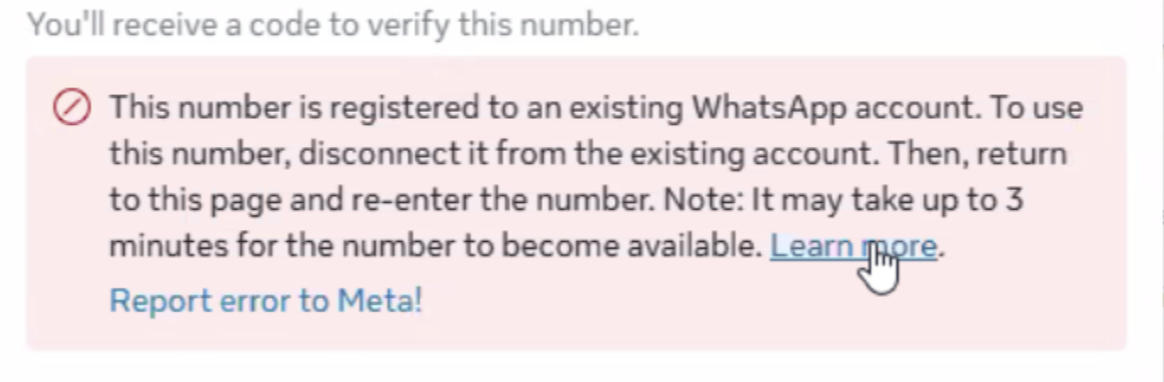
Error: “This number is registered to an existing WhatsApp account”
Modified on: Mon, 12 Jan, 2026 at 12:08 AM
What does this error mean?
This error appears during WhatsApp onboarding when the phone number you are trying to register is already linked to an existing WhatsApp account. WhatsApp allows a phone number to be active on only one WhatsApp account at a time.
To proceed with onboarding, the number must be fully disconnected from any existing WhatsApp (consumer or business) account.
Common reasons this happens
The number is currently active on the WhatsApp consumer app.
The number is linked to a WhatsApp Business App.
The number was previously used for WhatsApp and not properly deleted.
The number was recently migrated and is still in WhatsApp’s cooldown period.
How to resolve the issue
Step 1: Remove the number from the existing WhatsApp account
On the device where the number is currently active:
Open WhatsApp or WhatsApp Business.
Go to Settings → Account.
Select Delete my account.
Confirm the phone number and complete the deletion.
Important: Simply uninstalling the app is not sufficient. The account must be deleted from WhatsApp settings.
Step 2: Wait for WhatsApp to release the number
After deleting the account:
Wait up to 3 minutes for WhatsApp to fully release the number.
In some cases, it may take slightly longer depending on WhatsApp’s systems.
Step 3: Retry onboarding
Return to the onboarding page.
Re-enter the phone number.
Request and verify the OTP again.
If the error still persists
Ensure the number is not active on any other device.
Confirm the number is not tied to another Meta Business Manager or WhatsApp Business Account.
Wait 10–15 minutes and retry if the number was recently deleted.
If the issue continues, contact support with:
Phone number (with country code)
Screenshot of the error
Business Manager ID (if applicable)
Best practices to avoid this error
Always use a new or unused phone number for WhatsApp onboarding.
Avoid reusing numbers that were recently connected to WhatsApp.
Do not attempt onboarding while the number is still active on any WhatsApp app.