
Sites / SEO
SEO - A Guide to Boosting Your Search Rankings
Modified on: Thu, 12 Feb, 2026 at 9:14 AM
This guide will walk you through everything you need to know about SEO, its features and benefits.
TABLE OF CONTENTS
- What is the SEO feature in OmniReach?
- Key Features of SEO
- Understanding the Billing Structure
- SEO Feature Quotas
- Step-by-Step Guide to Getting Started
- Frequently Asked Questions
- Related Articles
What is the SEO feature in OmniReach?
The SEO is an integrated Search Engine Optimization solution powered by Search Atlas. This tool allowing businesses and agencies to optimize websites without needing third-party tools. It provides powerful features for keyword research, website auditing, backlink analysis, content optimization, and SEO reporting.
With its automation and white-label capabilities, agencies can seamlessly offer SEO services to their clients while keeping branding consistent.
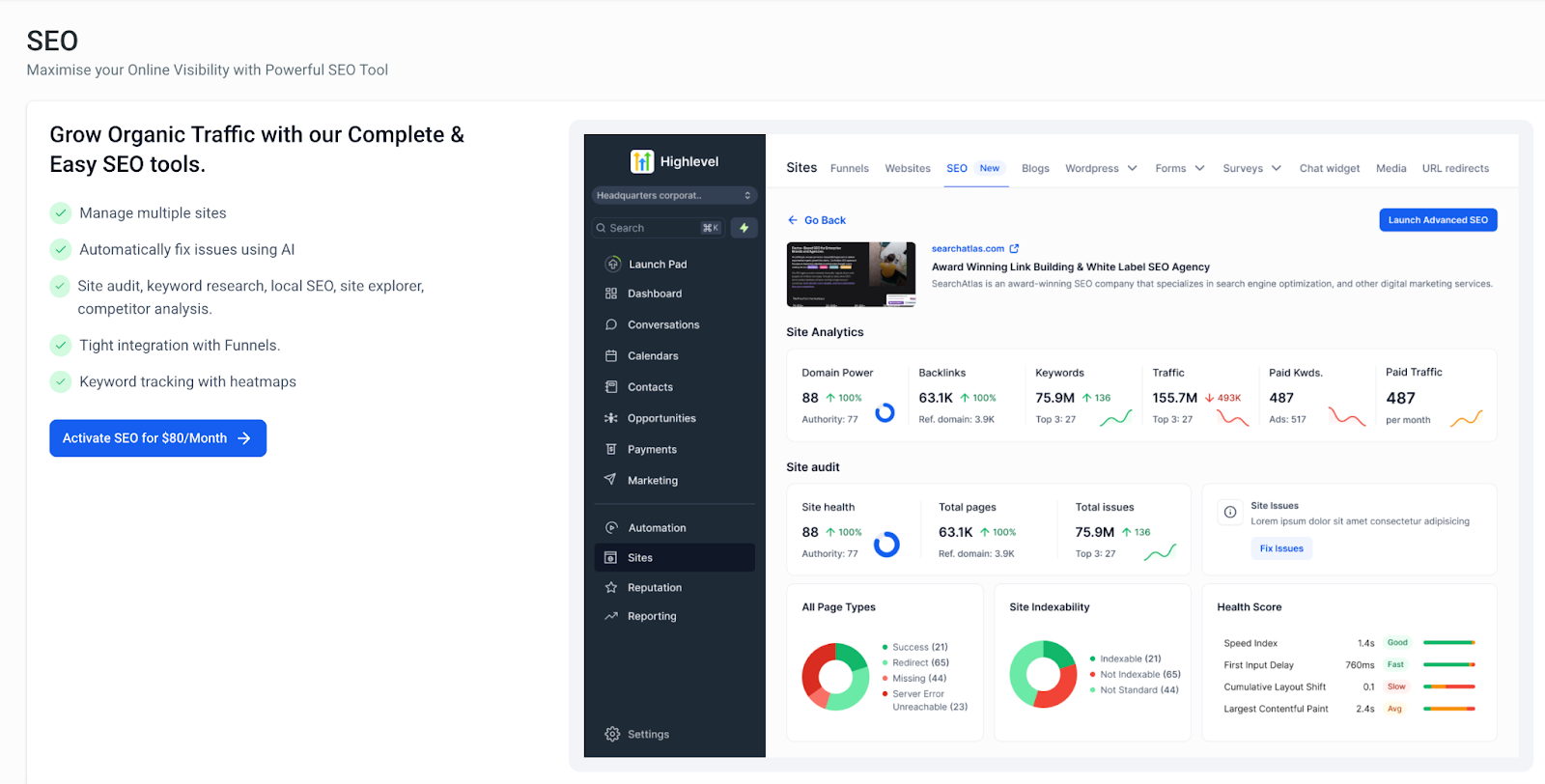
Key Features of SEO
SEO provides a comprehensive suite of tools for optimizing websites, tracking rankings, conducting audits, and managing SEO campaigns efficiently. Below is a detailed breakdown of all key capabilities:
Manage Multiple Sites
Optimize and track SEO performance across multiple websites from a single dashboard.
- Centralized management allows agencies to handle multiple client websites efficiently.
- Assign custom SEO strategies to different sites while keeping data organized.
Automatically Fix Issues Using AI
- AI-powered recommendations to resolve common SEO errors instantly.
- Automated fixes for:
- Issues in Meta description
- Issue in Title Tags
- Missing image alt text tags
- Issues in keywords
On-Page Audit
- Conduct detailed on-page SEO audits to identify errors affecting rankings.
- Analyze and optimize key on-page elements, such as:
- Title tags & meta descriptions
- Header structure (H1, H2, etc.)
- Image optimization & alt tags
- Internal linking structure
- Generate a prioritized list of issues with AI-driven recommendations for fixes.
Keyword Research & Tracking
- Discover high-performing keywords for your niche with advanced research tools.
- Analyze keyword difficulty, search volume, and ranking potential.
- Track keyword rankings over time with real-time updates.
- Use heat maps to visualize keyword performance trends.
Website Audit & Optimization
- Perform full-site audits to identify issues affecting search visibility.
- Automated detection and resolution of:
- Duplicate content
- Broken links & 404 errors
- Schema markup errors
- Page load speed issues
- Local SEO tools to optimize geo-targeted search results.
- Site Explorer for in-depth domain and competitor analysis.
Keyword Rank Tracker
- Track keyword rankings for up to 1,000 keywords.
- Monitor fluctuations in rankings across search engines.
- Identify growth opportunities and areas needing improvement.
- Multi-site keyword tracking for agencies managing multiple clients.
Backlink Analysis & Monitoring
- Analyze your website’s backlinks to assess their quality and impact on rankings.
- Identify and disavow toxic backlinks to prevent search penalties.
- Monitor new and lost backlinks with automated tracking.
- Competitive backlink analysis to refine your link-building strategy.
Content Genius – AI-Powered Content Optimization
- NLP content analysis: AI reviews your content for keyword usage, semantic relevance, headings, meta data, internal links, and user intent.
- Instant fix suggestions: Highlights missing headings, weak internal links, or incomplete metadata. Applying fixes uses credits; viewing doesn’t.
- Internal link guidance: Recommends strategic internal links to boost authority and engagement.
- Infinite scroll interface: Browse all AI recommendations in one continuous view with filters and sorting for quick triage.
- Accurate issue tracking: Counts for flagged pages and fixes now stay consistent across all views.
- Credit management: Applying fixes consumes AI quota (e.g., 3 credits per article in Premium plans).
- Optimized for scale: Continuous scrolling supports bulk reviews; close the details drawer and use filters for smoother performance.
Content Planner
- Organize and structure your content strategy efficiently.
- Plan up to 15 topic clusters for targeted content creation.
- AI-powered recommendations for pillar pages and supporting content.
- Ensure content alignment with search intent and SEO best practices.
SEO Reporting & Analytics
- Generate in-depth, data-driven SEO reports with actionable insights.
- Track key SEO performance metrics, including:
- Keyword rankings
- Organic traffic trends
- Engagement metrics
- Multi-site reporting for agencies managing multiple clients.
- White-label reporting to provide professional SEO insights to clients under your brand.
Tight Integration with Funnels and Websites
- Optimize funnel pages to improve organic traffic and conversions.
- AI-driven SEO recommendations for high-converting sales pages.
- Ensure seamless integration between SEO strategies and lead generation funnels.
Understanding the Billing Structure
SEO follows a flexible billing model:
Charge for Agencies:
- A monthly fee of $79 per sub-account enabled.
Reselling Model (For Agencies)
- Your clients pay your agency directly.
- You manage payments via Stripe or another gateway.
- We charge you per sub-account using the SEO features.
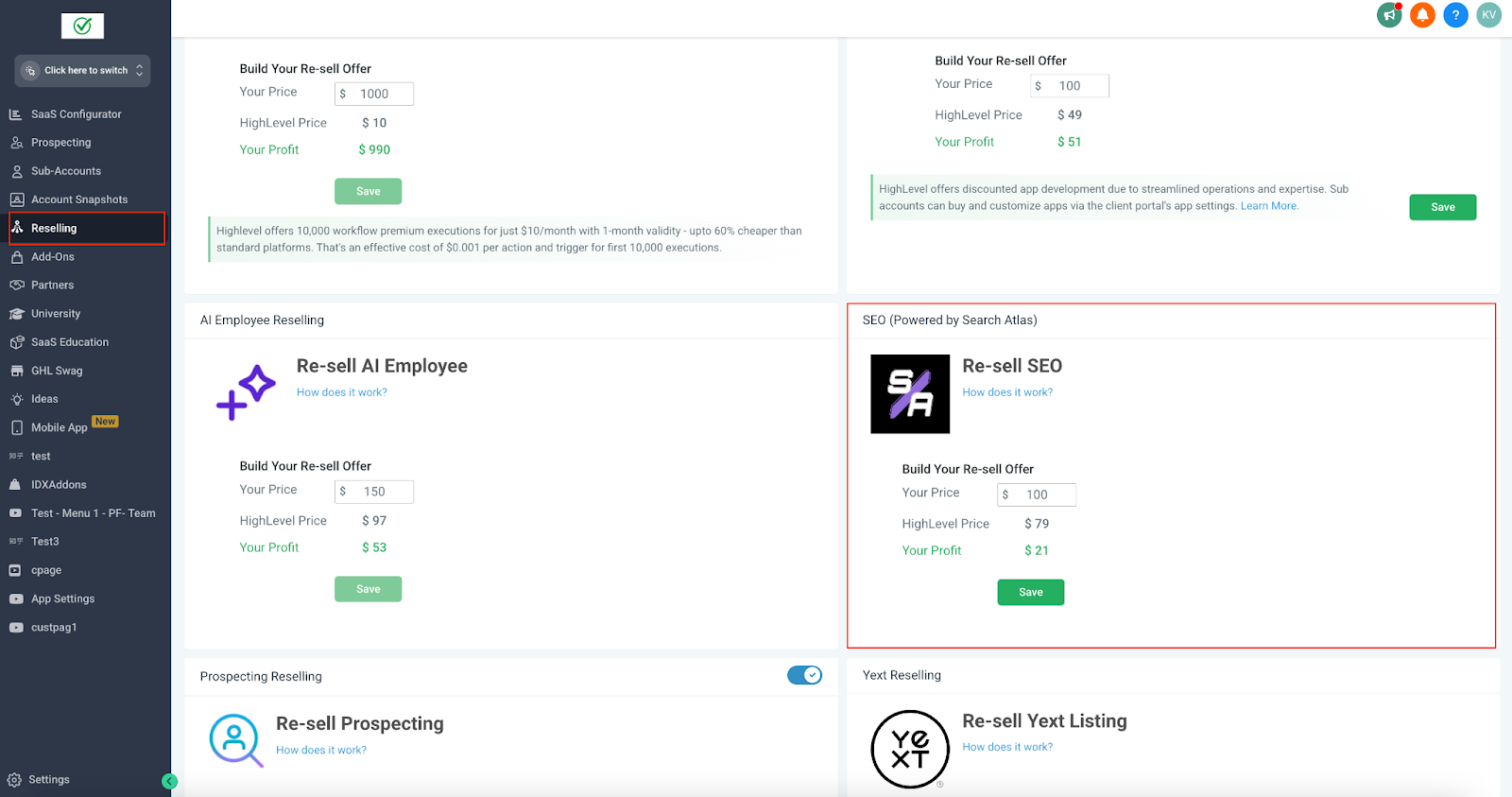
To review your SEO expenses:
- Go to Agency Settings → Billing → SEO Subscription.
- Click ShowSub-Accounts to view charges for each client.
SEO Feature Quotas
While SEO offers powerful tools for optimizing your website, there are certain usage limits for each feature. Understanding these limitations can help you plan your SEO strategy effectively.
| Feature | Quota | Credits Usages(Per Request) | Where to find it? | Refreshed Monthly? |
| Sites (Adding a site will automatically pull data from Site Audits and Site Explorer, and will consume quota for both features.) | 4 - Total 20 pages | 1 Credit Per Site | Add Site Project or Launch Advanced SEO | No |
| AI Fixes Generation quota | 500 | 1 Credit for one AI Suggestion | After Adding a Site > AI Reccomendations | No |
| Site Explorer | 10 | 1 Credit Per Site | Add Site Project or Launch Advanced SEO | No |
| Premium AI Quota | 10 | 3 Credits per article | Launch Advanced SEO > Content > Content Genius | Yes |
| Articles quota | 30 | 1 per space for storing articles | Launch Advanced SEO > Content > Content Genius | Yes |
| Content Assistant Keywords | 100 | 1 per keyword | Launch Advanced SEO > Content > Content Genius Input | Yes |
| Onpage In-Depth Audits | 40 | 1 per request | Launch Advanced SEO > Content > Onpage Audit | Yes |
| Content Plans | 10 | 1 per request | Launch Advanced SEO > Content > Content Planner | Yes |
| GSC Projects | 4 | 4 per request | Launch Advanced SEO > Site Metrics > GSC Performance | No |
| Keywords per Site | Top 10000 | 1 per request | Launch Advanced SEO > Keywords > Keywords Rank Tracker > Any Project | Yes |
| GSC Pages | Top 2000 | 1 per request ( but only one site) | Launch Advanced SEO > Site Metrics > GSC Performance | Yes |
| Backlink Research Credit | 10000 | 1 per request | Launch Advanced SEO > More > Backlinks > Backlinks Research | Yes |
| Keyword Research Lookups | 100 | 1 per request | Launch Advanced SEO > Keywords > Keywords Research | Yes |
| Keyword Rank Tracking Projects | 5 | 1 per request | Launch Advanced SEO > Keywords > Keywords Rank Tracker | No |
| Keyword Rank Tracking credits | 1000 | 1 per request | Launch Advanced SEO > Keywords > Keywords Rank Tracker | Yes |
| Siite Audit Projects | 4 | 4 Max, 1 per Request | Launch Advanced SEO > Site Audit > All Audits | Yes |
| Local SEO Heatmaps points | 1000 | Each pin on a heatmap uses 1 quota point. Quota is consumed every time Search Atlas runs, refreshes, or prefetches a scan. For circle maps, more layers mean more quota: for example, 1 layer uses 7 points, 2 layers 20, 3 layers 39, and so on up to 7 layers at 175. Rectangular grids use quota based on size, such as 3x3 needing 9 points, 4x4 needing 16, up to 7x7 at 49 points. For example, choosing a circle with 3 layers (61 pins) and scanning weekly would use about 244 credits per month. | More > Local SEO > Local SEO Heatmap | Yes |
| Report Builder | Unlimited | Unlimited | Launch Advanced SEO > Report Builder | Yes |
| Users (seats) | Unlimited | Not Usable | Not Usable | - |
| Total Pages Crawled per month | 50000 | 1 per request | - | Yes |
| Historical Data Limit | Unlimited | Unlimited | - | Yes |
Quota visibility and exhaustion indicators
- Premium AI quota for article generation is shown in the Quota Info/Quota Usage area so you can track available usage.
- When a quota is exhausted, only the exhausted quota is highlighted in red. Other quotas in the same row remain normal so you can clearly see what is still available.
Step-by-Step Guide to Getting Started
- To get started, log in to your sub-account account and navigate to Sites > SEO.
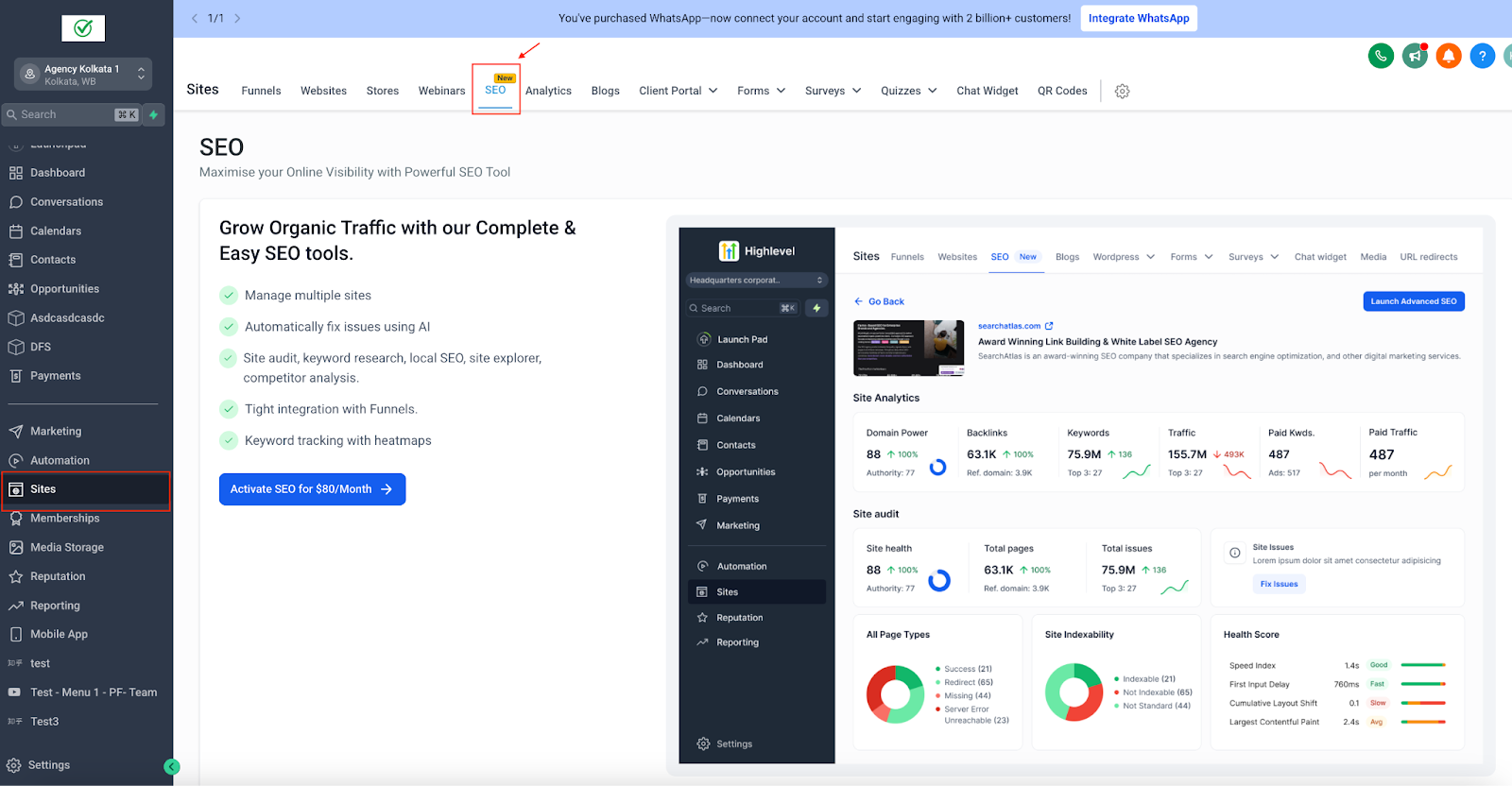
- Main SEO Dashboard Tabs, you’ll notice three primary tabs in the SEO section: Site Projects, Local SEO, and Settings.
- Site Projects: For monitoring websites (domains) – shows overall site metrics, health, backlinks, traffic, etc.
- Local SEO: For tracking Google Maps rankings of local businesses – uses interactive heatmaps for local keyword positions.
- Settings: For checking your quota usage.
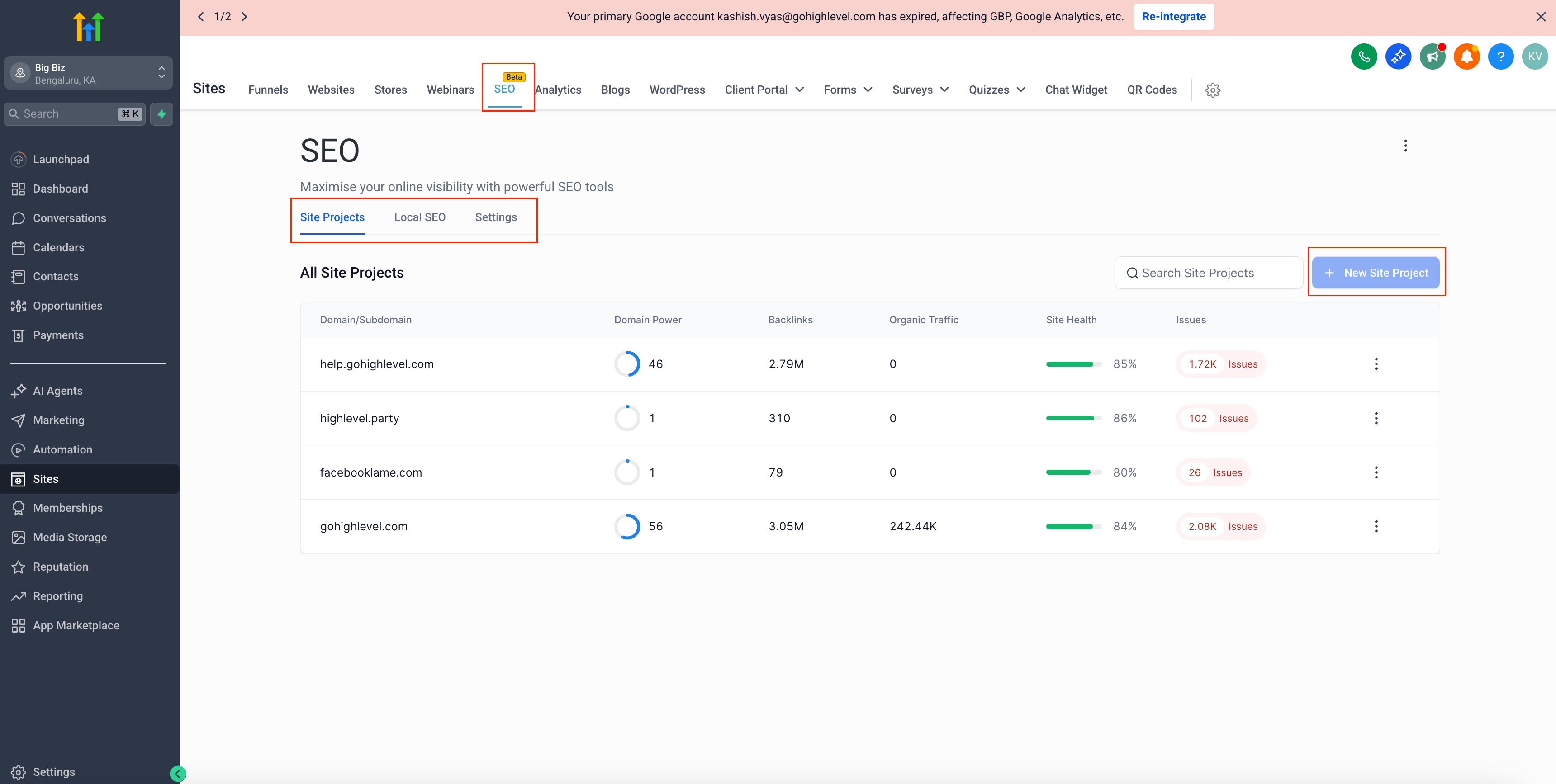
- Site Projects: For monitoring websites (domains) – shows overall site metrics, health, backlinks, traffic, etc.
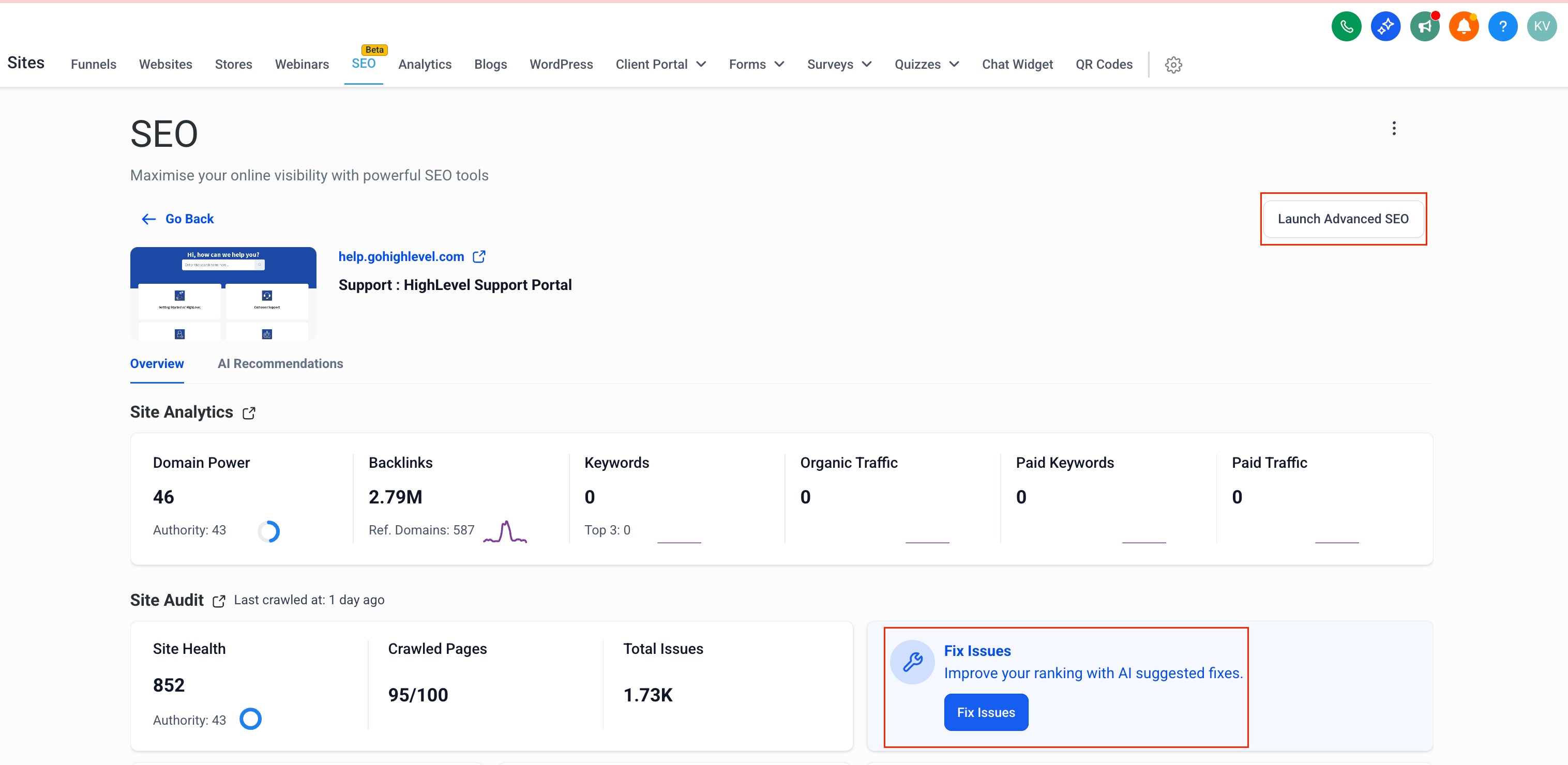
- Launch Advanced SEO: Within the SEO dashboard, you will see a button labeled “Launch Advanced SEO”. Clicking this opens the full suite of SEO tools in a new window with an expanded toolkit for in-depth analysis, content creation, and reports.
Frequently Asked Questions
Q: Why don’t I see the SEO tab under Sites?
The SEO tab only appears after the agency enables SEO Reselling for that specific sub-account.
Q: Can I manage multiple sites?
Yes, track and optimize multiple websites from one dashboard with site-specific strategies.
Q: What can AI fix automatically?
Meta descriptions, title tags, missing image alt text, and keyword issues (with AI recommendations and instant fixes).
Q: What is the limit of the Rank Tracker?
Track up to 1,000 keywords, across search engines and multiple sites.