
Marketing / Affiliate Manager Automation
Automate Affiliate Sales Follow-Ups with the “New Affiliate Sale” Trigger
Modified on: Tue, 24 Mar, 2026 at 7:47 AM
Want to save time and engage affiliates automatically after a sale? The New Affiliate Sale trigger in Workflows lets you do exactly that. Whether it’s sending a congratulatory message or reminding an affiliate to add payout details—this trigger handles it all for you.
TABLE OF CONTENTS
What is the New Affiliate Sales Trigger?
The New Affiliate Sale trigger fires every time an affiliate successfully makes a sale—whether it's a one-time, recurring, or manually tracked transaction.
You can use it to:
- Congratulate affiliates
- Notify customers
- Assign tasks
- Segment contacts
- And more—automatically
Filters available
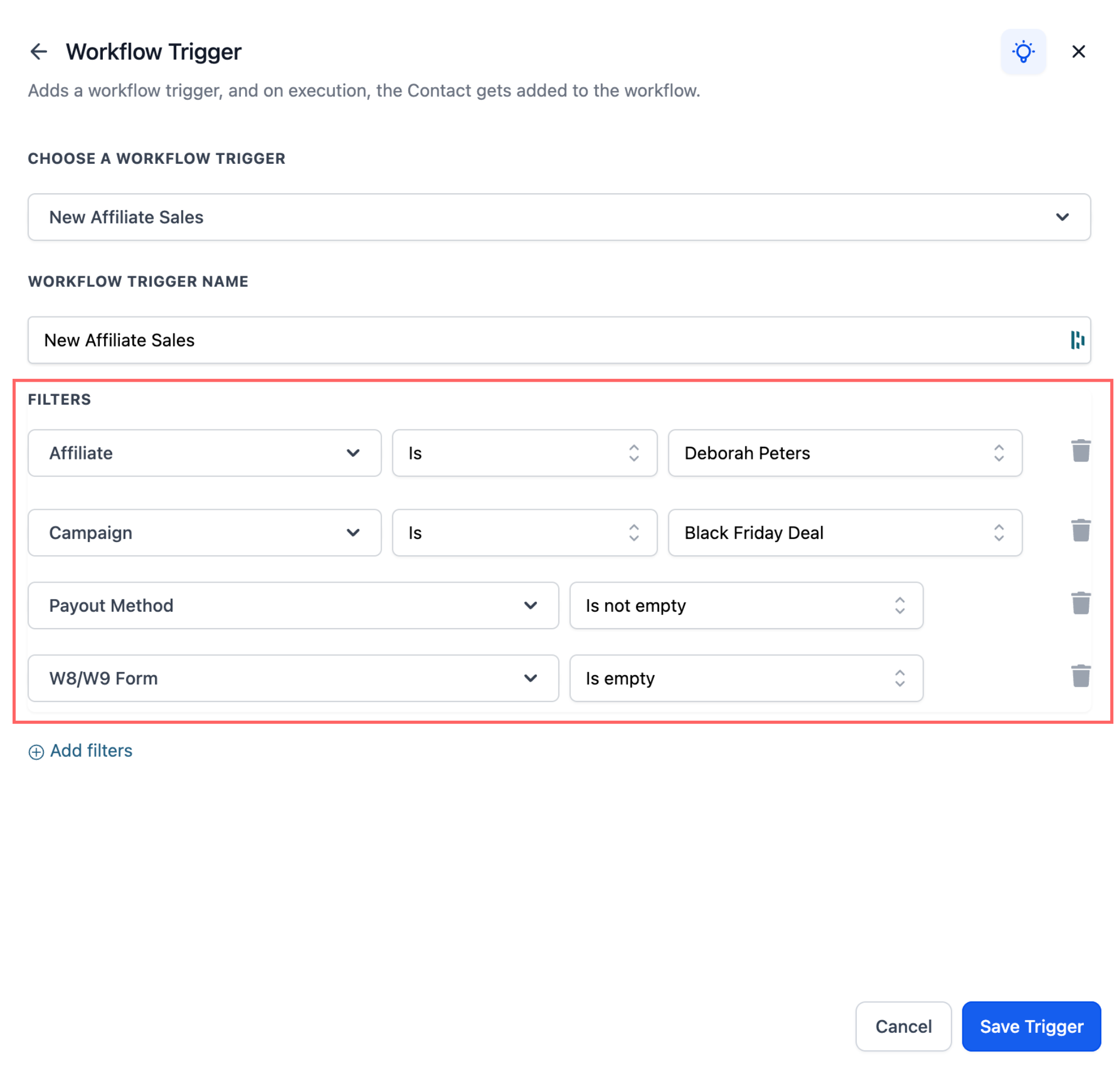
You now get extra control with these filters:
- Affiliate filter – Target specific affiliates
- Campaign filter – Trigger actions for sales from selected campaigns
- Payout method check – Trigger only if the affiliate has (or has not) added a payout method
- Tax form check – Trigger based on whether the affiliate has submitted tax forms
How to Set It Up
To use the Affiliate Sales Trigger within your workflows:
- Go to Automations > Workflows
- Click Create New Workflow or open an existing one
- Add a trigger: search for New Affiliate Sale
- Apply optional filters (affiliate, campaign, payout method, tax form)
- Add actions (email, SMS, task, tag, etc.)
- Click Save
Popular Use Cases
Here are a few examples of how to put the Affiliate Sales Trigger to use:
1. Congratulate the Affiliate
- Why: Keeps affiliates motivated and increases repeat promotion.
- How: After the trigger fires, add an affiliate communication action (example: Internal Notification) so the message goes to the affiliate rather than the buyer contact.
Note: This action sends an internal notification (to the business/admin) about the affiliate sale. It does not send an email to the affiliate. - Example message: “Congrats on your new sale! ? Keep it going—your commissions are growing.”
Add an Internal Notification action to alert your team whenever a new affiliate sale occurs.The “Send Email to Affiliate” action is intended for internal alerts, not communication with the affiliate.
2. Remind Affiliates to Complete Payout Info
- Why: Reduce payout delays
- Example: Send a reminder: "Update your payout method to receive your commission."
3. Tag Customers from Affiliate Sales
- Why: Segment affiliate-driven leads for future campaigns
- Example: Add tag: "Affiliate Customer"
By implementing these automations, businesses can create a seamless experience for both affiliates and customers, enhancing satisfaction, engagement, and performance.
Related Articles
Automate Lead Assignment & Notifications in Affiliate Manager Workflows
Gamification/ Leaderboard triggers and actions for Community groups