
Phone System / Messaging
Track SMS Restriction History
Modified on: Fri, 26 Sep, 2025 at 4:14 PM
The SMS Restriction History dashboard gives you transparent visibility into any warnings or temporary restrictions applied to SMS sending in a sub‑account. It helps you understand what happened, when, and why, so you can quickly correct issues and keep messaging compliant.
TABLE OF CONTENTS
- What is SMS Restriction History?
- Where to find the SMS Restriction Log
- Using the Restriction Log
- Threshold guidance
- What are the error and opt-out rates good for having a threshold?
- Frequently Asked Questions
What is SMS Restriction History?
The SMS Restriction History dashboard provides businesses with a transparent way to track and manage their SMS sending activities. Logging warnings and restrictions helps users stay compliant with carrier guidelines and avoid disruptions in communication. A read‑only log showing warnings and temporary sending restrictions triggered by carrier‑ or policy‑driven thresholds. Typical causes include:
- Daily/Weekly sending limit violations
- High opt‑out rate
- High delivery error rate (including carrier filtering such as Error 30007)
Example:
If a campaign generates a 6% opt‑out rate—above the 2–3% target you should stay under—the sub‑account may receive a temporary restriction. The log captures the date, time, and additional details so you can investigate and avoid repeats.
Where to find the SMS Restriction Log
Navigate to Location → Settings → Phone Numbers → Advanced Settings (top‑right). In the far‑right tab, click Restriction History to view events for the sub‑account.
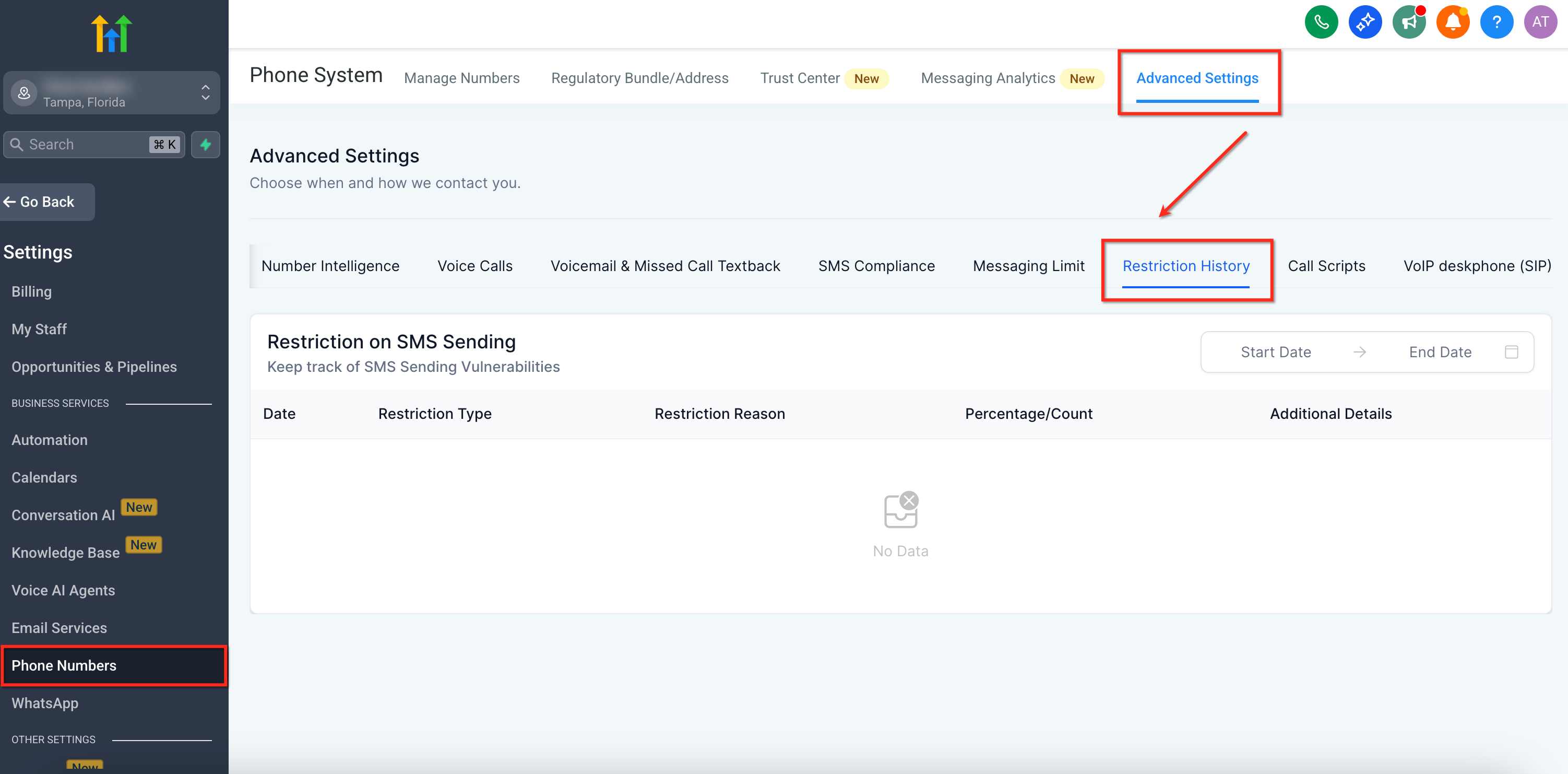
On the right-hand side of the table, there are Start Date and End Date filters, allowing users to view restriction history for a specific time period.The pagination control at the bottom ensures that users can navigate through multiple pages of restriction records.
Using the Restriction Log
The table lists each restriction event with:
Date — when the warning or restriction occurred
- Restriction Type — Warning or Temporary Restriction
- Restriction Reason — e.g., Opt‑out rate exceeded threshold
- Percentage / Count — the measured value at the time (e.g., opt‑out %)
- Additional Details — related metrics such as Error Rate
Threshold guidance
- Opt‑out rate: Target: stay below 2–3% to avoid risk. Good: 0–1%. At 3%, the sub‑account is locked for 24 hours.
- Delivery error rate: Good: 0–6%. At 10%, the sub‑account is locked for 24 hours.
What are the error and opt-out rates good for having a threshold?
- A High Opt-Out rate indicates that contacts receiving your messages have objected, generated complaints, or marked your SMS as spam. A good opt-out rate is typically in the range of 0—1%. Once the opt-out rate hits 3%, the sub-account will be locked for sending text messages for 24 hours.
- A High Delivery Error Rate indicates that you are sending SMS to contacts that are no longer in service, are unreachable, or use a non-SMS-capable device, such as a landline. This may also mean that external carrier filters are refusing to deliver your SMS due to bad sending behavior in the past. A good error rate is typically in the range of 0—6%. Once the error rate hits 10%, the sub-account will be locked for sending text messages for 24 hours.
Frequently Asked Questions
Q. Does Restriction History show real‑time data?
It records events with timestamps; use date filters to explore windows of time.
Q. Will I see both warnings and temporary restrictions?
Yes—the log includes warnings and temporary restrictions along with the reason and measured values.
Q. How do I lower my error rate?
Clean lists regularly, remove landlines, verify numbers during capture, and avoid content patterns that trigger filtering.